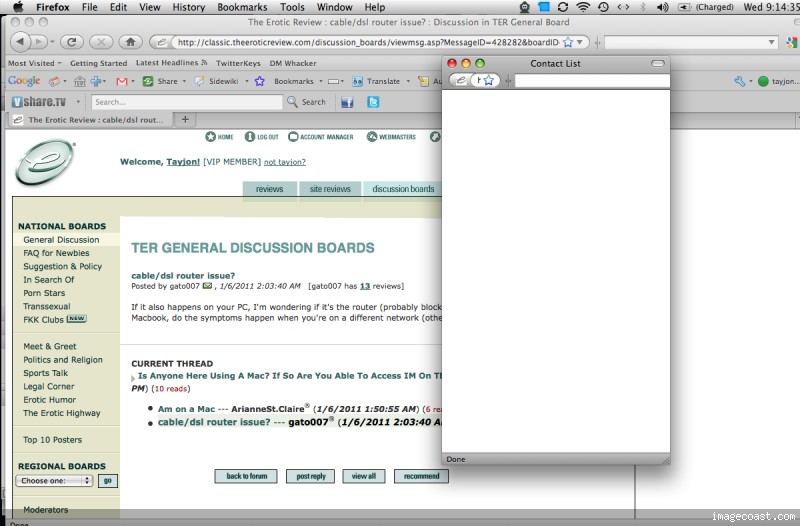
I have a Macbook and I can never seem to get on the IM feature here on TER. Does anyone else have this issue? If so how can I solve it. I have tried to access it using Safari, Mozilla, and Flock all to no avail. I really want to use the feature.....
PLEASE HELP.....
P.S- Truth be tod I cant access it when I use my PC either trying with Mozilla, IE, or Google Chrome!!
If it also happens on your PC, I'm wondering if it's the router (probably blocking TCP/UDP ports)? Since you have a Macbook, do the symptoms happen when you're on a different network (othe than the one in your home)?
Pop-up blockers and I have it set to block pop-ups but with an exception for TER
Also I can NEVER get on the chat no matter what network I use on either of my laptops.....
Whenever I attempt to open the chat, the box comes up but the screen is simply blank and the status at the bottom of the screen says done.....Here is what I get on my end.......
Check to see if Flash Player is installed with latest version. If you go to this site, it will probably tell you if it's installed and what version. http://www.adobe.com/software/flash/about/
the Flash player cache might be corrupted, and to fix it you need to delete the cache. Instructions:
1. Close all browsers (quit).
2. Open a Finder window, and click on your home folder (it is your name)
3. Open the folder named Library
4. Locate the folder named Preferences, and open it
5. Locate the folder named Macromedia, and open it
6. Open the folder named Flash Player, open the folder #SharedObjects where you will find another folder with a name composed of capital letters & numbers, open it and drag its contents to the trash, close it and then close the folder #SharedObjects.
7. Open the folder macromedia.com, Open support folder, open flashplayer folder, open sys folder and drag its contents to the trash.
8. Close all open folders and Empty the Trash.
9. Restart the computer.
10. Login to www.theeroticreview.com not the classic, and see if that will work.
Also you need only one exemption in Firefox and Safari which is theeroticreview.com, and it is the catch-all for any sub domain that TER uses. It is equivalent to "anything.theeroticreview.com" or more precisely "*.theeroticreview.com"
tayjon - I have macs that are running OS 10.4, 10.5, and 10.6, and I just checked them all with Safari, and I am able to do everything. IM's, chat, etc. I do not believe I have ever messed with any settings - since most of the time I do not use them to get on TER. You may want to see if your computer has any updates that need to be downloaded.
Unfortunately it looks like your attempt to purchase VIP membership has failed due to your card being declined. Good news is that we have several other payment options that you could try.
VIP MEMBER
, you are now a VIP member!
We thank you for your purchase!
VIP MEMBER
, Thank you for becoming VIP member!
Membership should be activated shortly. You'll receive notification!